
Assigned
Assignment List Page
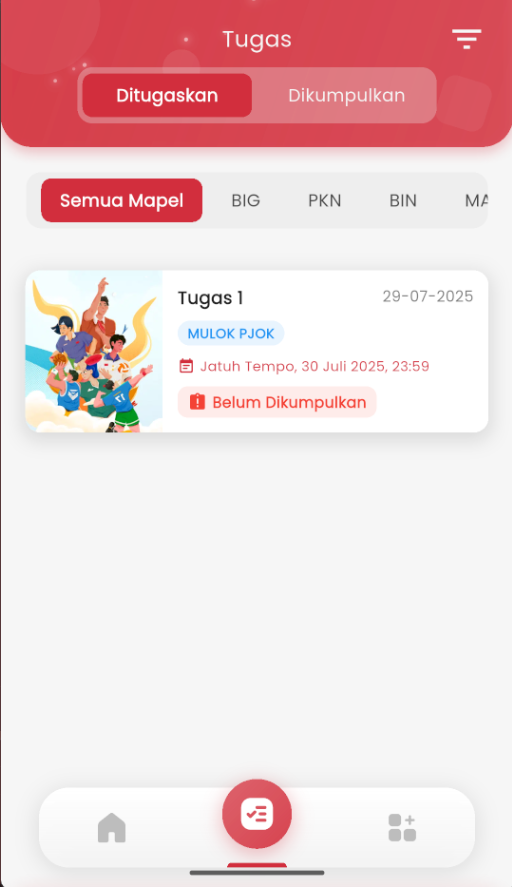
Before working on an assignment, you will be directed to the assignment list page. This page is the primary place to see all assignments given by teachers.
- Open the eSchool Mobile app, then tap the Assignments icon at the bottom of the screen.
- Here, you will see two tabs:
- You can filter assignments by subject by tapping the subject name like PKN, BIG, BIN, and others.
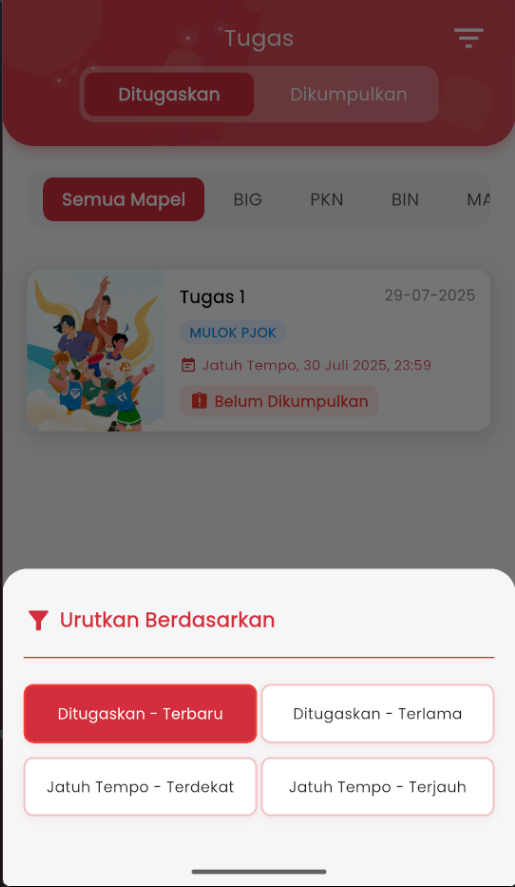
- Use the Sort By button to organize the assignment list as needed, such as:
- Most recently or oldest assigned
- Closest or farthest due date
- Each assignment will display:
- Assignment title
- Subject
- Created date and deadline
- Collection status (e.g.: Not Submitted)
- When you're ready, just tap one of the assignments to enter the assignment details page. There you can read instructions, write your answer, and submit it directly!
Tips: Check this page regularly so you don't miss important assignment deadlines!