
Announcements
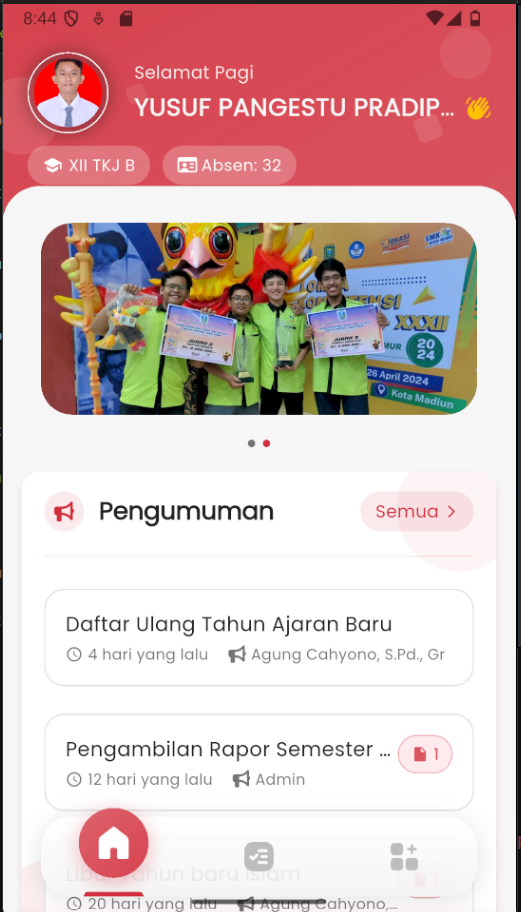
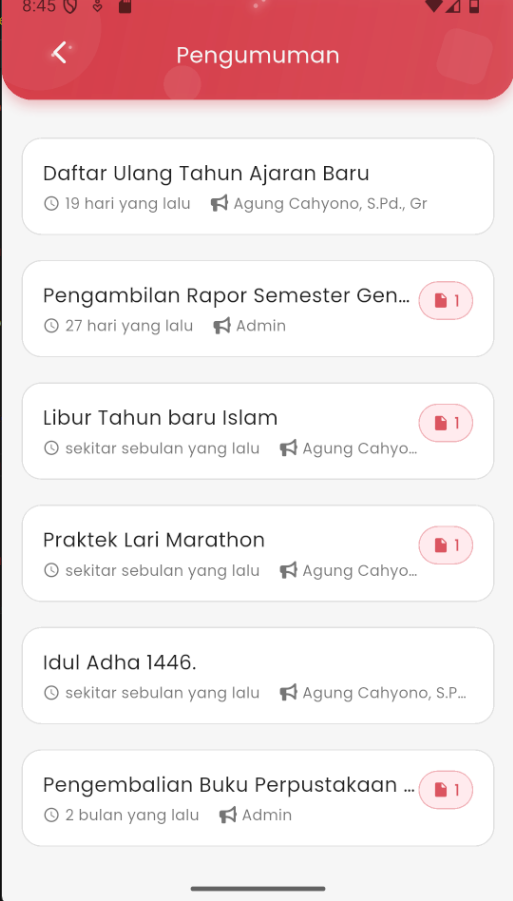
Viewing School Announcements
The Announcements feature in eSchool Mobile makes it easy for students to stay updated with the latest information from the school directly through the application.
Accessing Announcements
- From the main page, you will see the Announcements section right below the student identity card.
- Several latest announcements will be displayed there, complete with:
- Announcement title
- Published time (e.g.: 4 days ago)
- Sender's name (teacher or admin)
- A 📎 icon if there is an attachment
- To view all announcements, tap the "All >" button in the top right corner.
Announcement Page Interface
On the full announcement page, you will find a complete list of announcements based on time, starting from the newest. The information displayed for each item includes:
- Announcement title
- Date/time the announcement was published
- Sender's name
- Attachment icon if there is a downloadable file
Note: If an announcement contains an attachment, you can tap the 📎 icon to view or download the provided file (e.g., notification letter, schedule, or form).
This feature ensures all students receive important information such as:
- Re-registration
- Report card distribution schedule
- Holidays
- School activities
- Other important information