
Teachers
Teachers Page – Information and Fast Access for Parents & Students
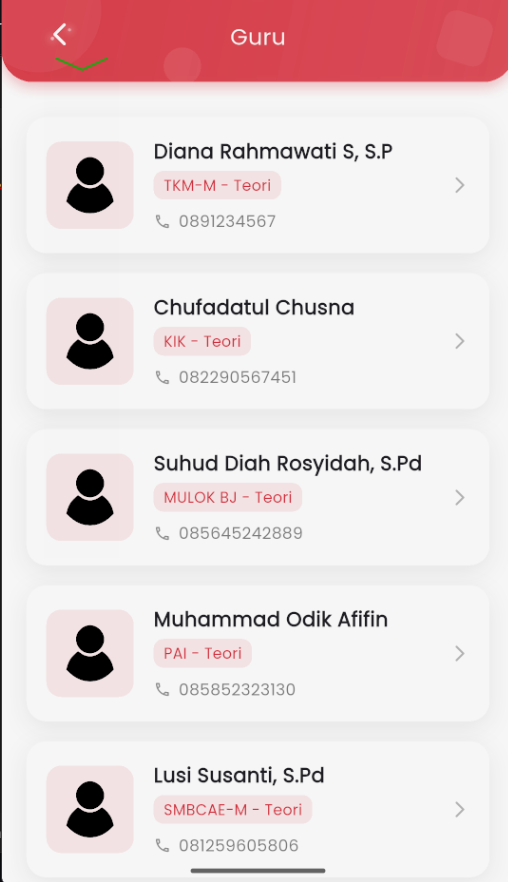
On the Teachers page, users can see the list of teachers who teach at the school. Each entry displays the teacher's name, subject, lesson type (e.g., Theory), and a copiable phone number. The interface is designed to be simple and easy to read for both students and parents.
Key Features:
- Teacher List: Displayed in informative cards, complete with profile icons.
- Subjects: Displayed under the teacher's name (e.g., MULOK BJ – Theory).
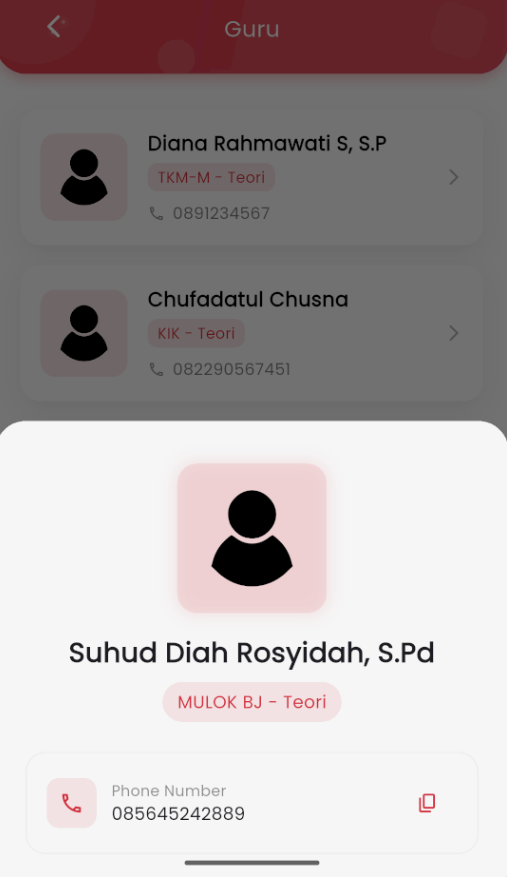
- Phone Number: Directly visible with a copy to clipboard feature using the 📋 icon so users can copy the number with a single tap.
- Teacher Details: When one of the teacher cards is clicked, a pop-up (bottom sheet) will appear, showing the teacher's information again with more focus, including the copy button for the number.
Convenience and Accessibility:
- Parents or students can directly copy the number to contact teachers if needed, such as for learning consultation, attendance, or other academic coordination.
- A clean design focused on readability to be easily accessible for all ages.
This page serves as a bridge between the school and application users, providing transparency and direct contact access to the teachers responsible for specific subjects.