
Subject Attendance
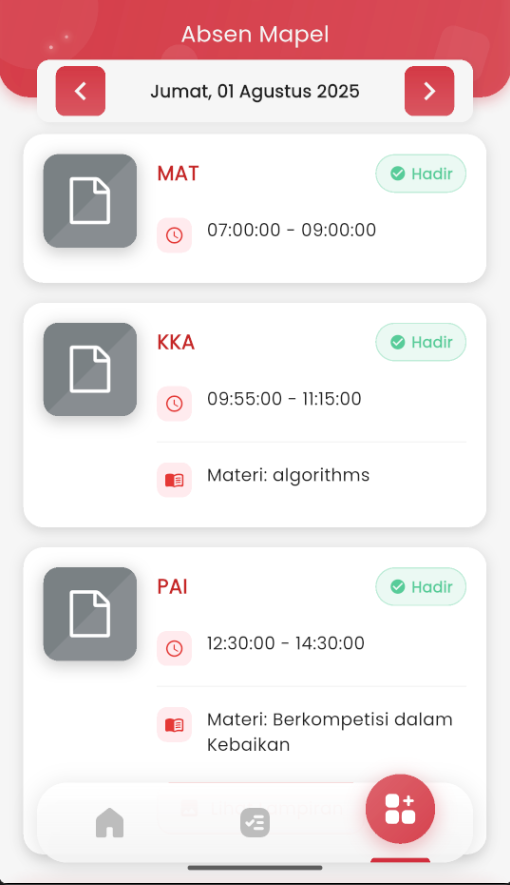
Subject Attendance – Attendance Recap Per Subject
The Subject Attendance page is designed to display students' attendance history in detail based on each subject followed on a given day. This information is presented in real-time and structurally, making it easier for students to monitor their involvement in daily learning.
Features and Information Displayed
- Date and Active Day: Displayed at the top and can be scrolled to previous or subsequent dates with arrow buttons, allowing users to see attendance for other days.
- Subject List: Arranged in order based on class periods.
- Subject Name (e.g.: MAT, KKA, PAI).
- Lesson Time: Displayed with a clock icon (⏰), indicating start and end times (e.g.: 07:00 – 09:00).
- Attendance Status: Labeled with a green tag for “✅ Present”, confirming student attendance in that session.
- Lesson Material: Displayed below the lesson time, providing information about the learning topics discussed by the teacher that day (e.g.: algorithms, Competing in Goodness).
Focus on Student Convenience:
- Students can monitor attendance per class period, not just overall.
- Learned Material is displayed so students stay connected with the taught topics, including for reviewing material if they were unable to attend.
- Intuitive and fast navigation to view attendance on other days.
- A clean visual interface, familiar icons, and attendance notifications make it easy for students to read information at a single glance.