
Announcements
Viewing School Announcements
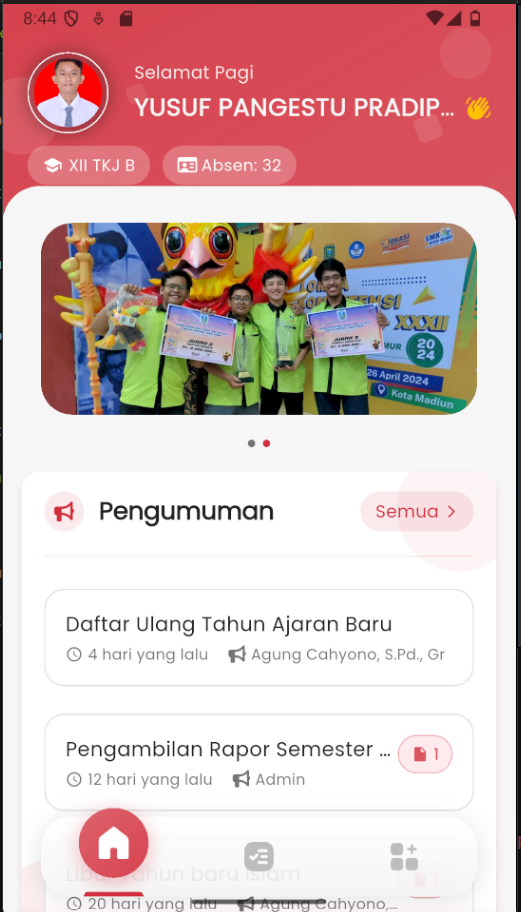
The Announcements feature in eSchool Mobile makes it easy for students and parents to know the latest information from the school directly through the application.
Features:
-
Accessing Announcements
- From the main page, you will see the Announcements section right below the student identity card.
- Several latest announcements will be directly displayed there, complete with:
- Announcement title
- Published time (e.g.: 4 days ago)
- Sender's name (teacher or admin)
- 📎 icon if there is an attachment
- To view all announcements, tap the "All >" button in the top right corner.
-
Announcement Page View
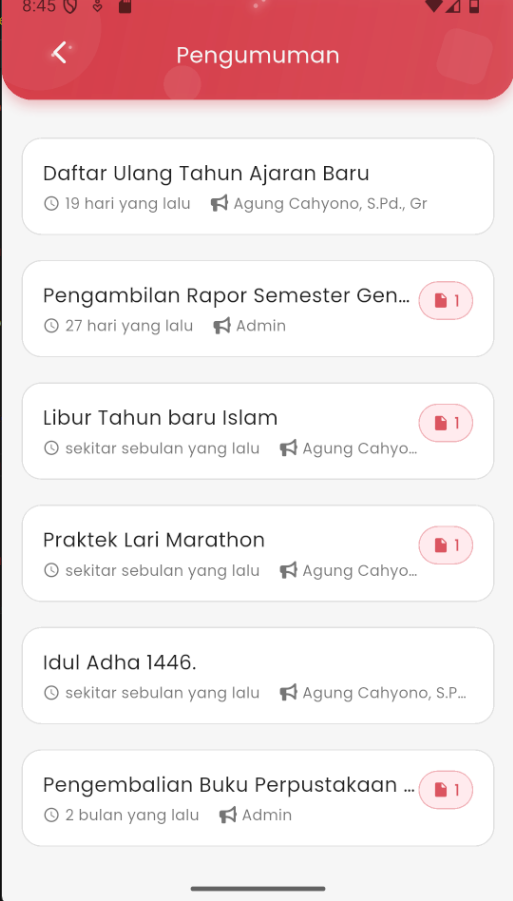
On the full announcements page, you will find a complete list of announcements sorted by time, starting from the latest. The information displayed in each item includes:
- Announcement title
- Date/time the announcement was published
- Sender's name
- Attachment icon if there is a downloadable file
Note: If an announcement contains an attachment, you can tap the 📎 icon to view or download the provided file (e.g., notification letter, schedule, or form).
This feature ensures all students and parents get important information such as:
- Re-registration
- Report card distribution schedule
- Holidays
- School activities
- Other important information