
Online Exam Process
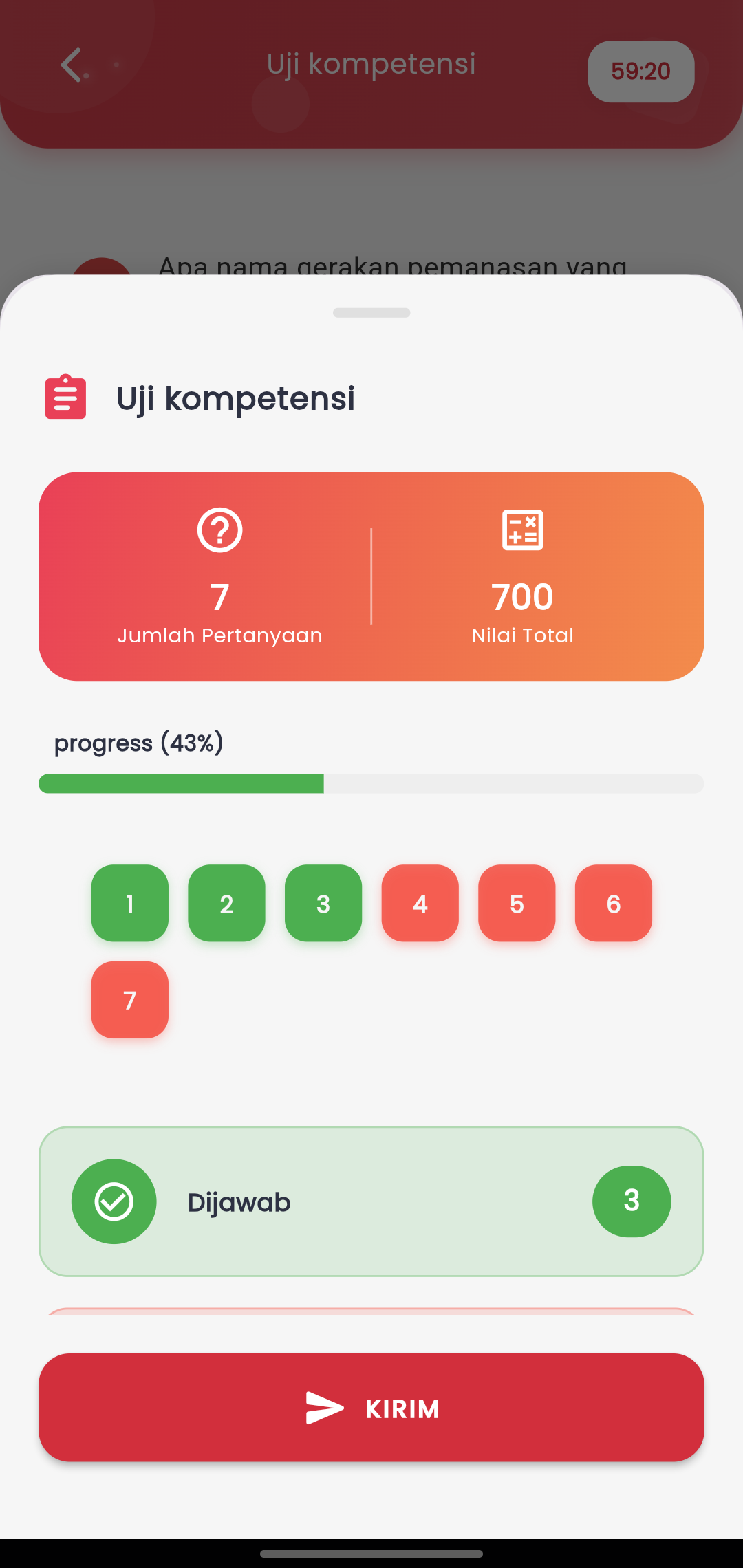
Take Exams Securely and Structurally with Full Control
The Exams feature in the eSchool Mobile app is designed to provide a comfortable, safe, and disciplined digital exam experience. The interface presents all essential elements on a single screen to keep students focused while answering questions.
Information Displayed:
- Number of Questions & Maximum Score
Students can directly see how many questions must be completed and the total score that can be obtained. - Exam Progress Bar
Displays the percentage of questions that have been answered to monitor progress visually. - Question Navigation with Color Indicators
Questions are displayed as numbered buttons:- Green: answered
- Red: not yet answered
Students can directly tap a question number to move to it.
- Answered Questions Recap
The number of questions filled is displayed directly before submission, allowing students to double-check. - Submit Button
Once everything is ready, students can send their exam results using the SEND/SUBMIT button at the bottom. Once sent, answers cannot be changed.
Exam Security Mechanism
To maintain exam integrity and prevent cheating, the system applies the following important rules:
- Screenshots Disabled
Students cannot take screenshots while the exam is in progress. - Active Alarm when Exiting the Application
If a student leaves the application while the exam is in progress, the system will immediately trigger a warning alarm. - Auto-Submit If Not Returned within 5 Seconds
If the student does not return to the application within more than 5 seconds, the system will automatically submit the exam results, even if not yet finished.