
Online Exam Results
Online Exam Results
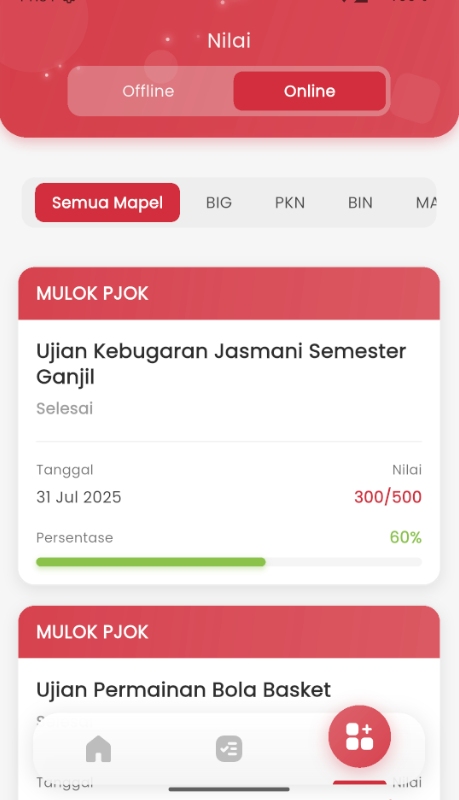
The Online Exam Results page is designed so that students can easily monitor their academic performance independently. With informative visuals and a clean layout, students can instantly see the scores from each exam they have taken.
Information Displayed
Each exam result card contains the following important information:
- Subject Name and Exam Title
Example:- Odd Semester Physical Fitness Exam (MULOK PJOK)
- Mathematics Final Semester Exam (MAT)
- Participation Status
- 🟢 Submitted → The exam is finished and the grade is viewable.
- 🔵 In Progress → The exam is still ongoing. The grade has not yet appeared.
- Exam Date
For example: July 31, 2025 - Score and Percentage
- Format:
200/500 (40%),0/1000 (0%), etc. - Also displayed in red or green according to the results obtained.
- Format:
- Progress Bar
A horizontal visual bar displays the success percentage directly, so students can quickly understand their performance.
Feature Objectives
- Provide full transparency for taken exam scores.
- Help students evaluate their academic achievements.
- Increase self-regulated learning awareness, as students can review results directly without waiting for manual announcements.
Advantages
- Dynamic and intuitive interface.
- Real-time status, changing immediately when the exam is taken.
- Grade information is easy to read and instantly understood by students.