
Online Exams
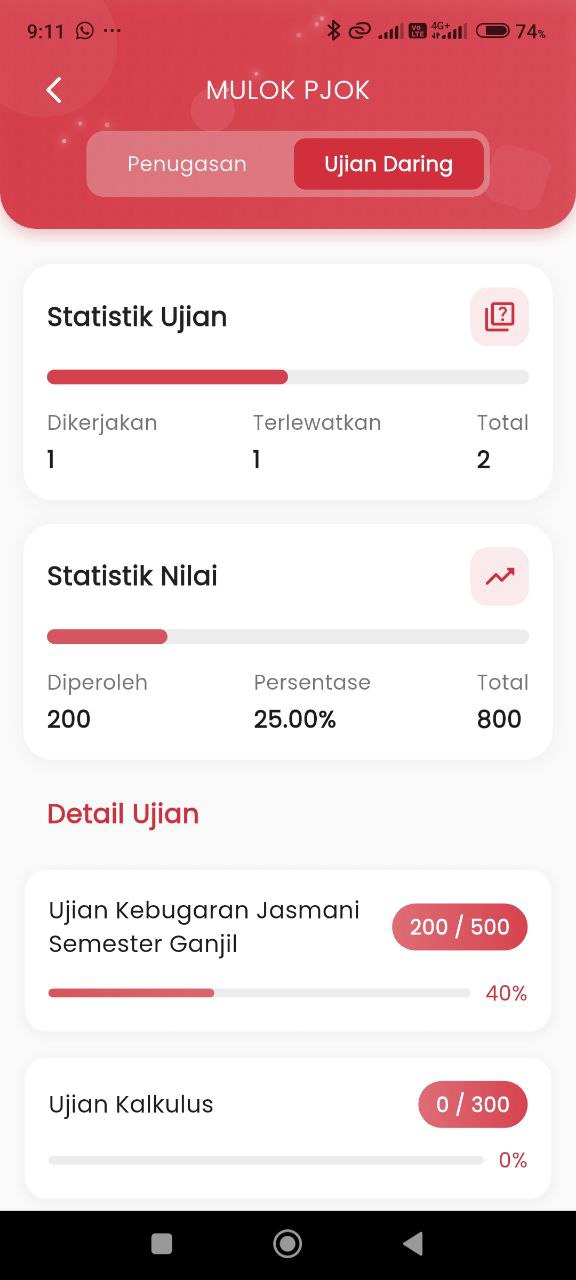
Online Exams – Student Exam Evaluation Report
After selecting a subject from the Reports page, users can switch to the Online Exams tab to view the recapitulation data of the exam results the child has taken online.
Features:
-
Exam Statistics
This section displays the student's performance in taking exams:
- Taken: The number of exams completed by the student.
- Missed: The number of exams skipped or not taken.
- Total: The overall number of scheduled exams.
Example:
- Taken: 1
- Missed: 1
- Total: 2
-
Grade Statistics
Shows the total points obtained from all online exams along with its percentage relative to the maximum score.
- Grade Obtained: Total score from taken exams.
- Percentage: Ratio of grade obtained to the total maximum grade.
- Total Grade: Accumulation of maximum points from all exams.
Example:
- Obtained: 200
- Percentage: 25.00%
- Total: 800
-
Exam Details
This section presents a complete list of each assigned exam, complete with:
- Exam Title
- Score obtained compared to total maximum score
- Grade percentage in a visual progress bar
Example:
- Odd Semester Physical Fitness Exam: 200 / 500 (40%)
- Calculus Exam: 0 / 300 (0%)