
Assignments
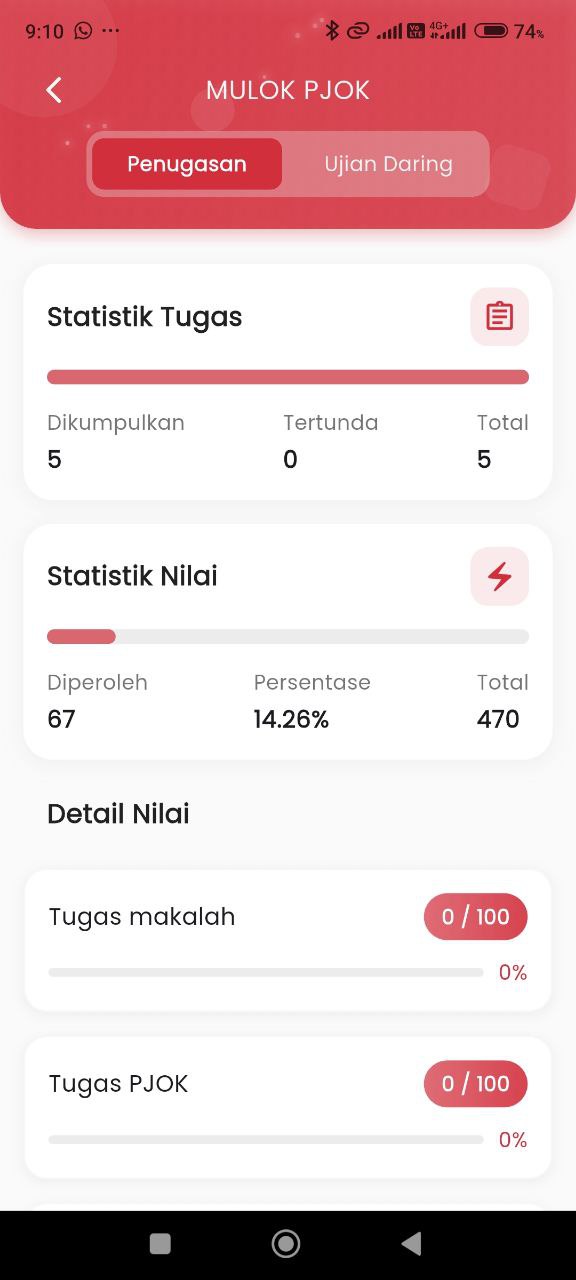
Assignments – Assignment Activity Report
After selecting a subject, users will be directed to the report page with two tabs: Assignments and Online Exams. The Assignments tab specifically presents a recap of the tasks that have been assigned and completed by the student.
Assignment Statistics
This section provides a general overview regarding:
- Submitted Assignments: Displays the total number of assignments successfully submitted by the student.
- Pending Assignments: The number of assignments not yet completed or past the deadline.
- Total Assignments: The overall number of assignments given by the teacher for that subject.
Example data:
- Submitted: 5
- Pending: 0
- Total: 5
Grade Statistics
This section displays assignment grade achievements in the form of:
- Grades Obtained: Accumulation of scores from graded assignments.
- Grade Percentage: Comparison of grades obtained against the total maximum grade of all assignments.
- Total Grade: The maximum score achievable from all assignments.
Example data:
- Obtained: 67
- Percentage: 14.26%
- Total: 470
Assignment Grade Details
Displayed as a list of individual assignments complete with:
- Assignment Title
- Score obtained vs. maximum
- Grade percentage progress bar (visual horizontal bar)
Example:
- Paper Assignment: 0 / 100 (0%)
- PE Assignment: 0 / 100 (0%)