
Payment History
Payment History
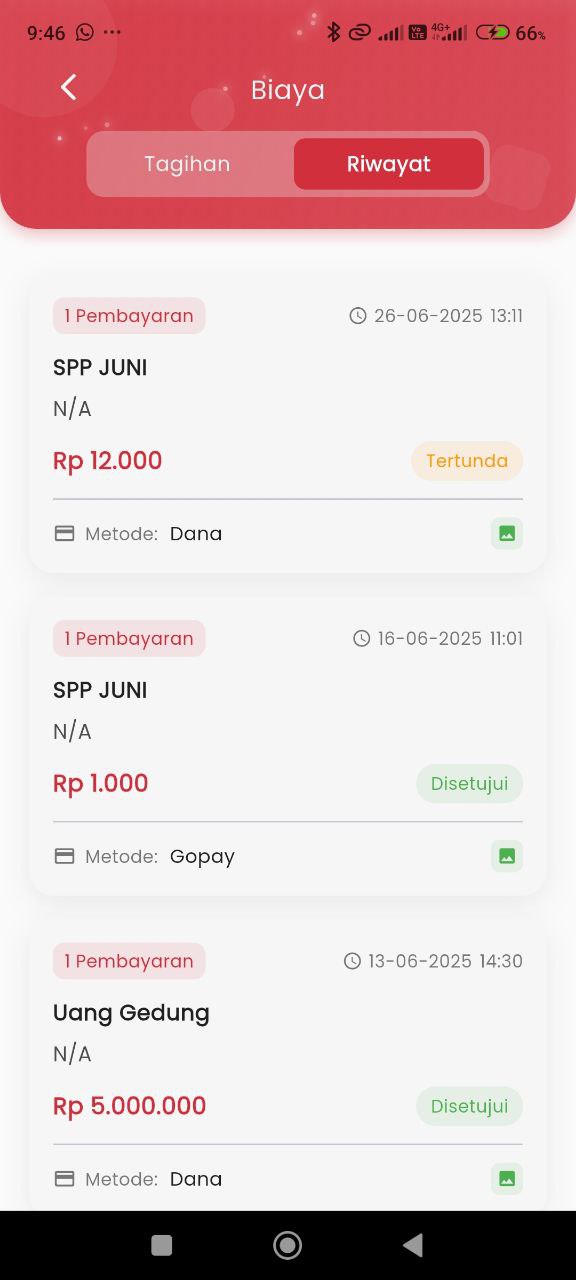
The History page in the Fees feature provides a complete recap of all payment transactions made by the user, whether they have been approved or are still pending. Information is presented neatly and is easy to read to help users track the student's education cost contribution history.
Information Displayed:
Each history item displays the following details:
- Payment Type: For example, “JUNE TUITION” or “Building Fee”
- Nominal Amount: Total cost paid (in Indonesian currency format)
- Payment Status:
- 🟢 Approved → Payment has been successfully verified.
- 🟡 Pending → Payment is still in the confirmation process.
- Date & Time of Payment: When the transaction was made.
- Payment Method: Such as Dana, Gopay, etc.
- Transfer Proof Icon: An icon is available to view proof of payment.
Transaction Examples:
- JUNE TUITION
- Rp 12,000 – Pending
- Method: Dana
- Date: 26-06-2025 13:11
- JUNE TUITION
- Rp 1,000 – Approved
- Method: Gopay
- Date: 16-06-2025 11:01
- Building Fee
- Rp 5,000,000 – Approved
- Method: Dana
- Date: 13-06-2025 14:30
Benefits of This Feature
- Provides transparency and complete documentation of every payment.
- Makes it easier for users (especially parents/guardians) to control school financial status.
- Provides transaction proof that can be accessed anytime if needed for administrative purposes.