
Bill List
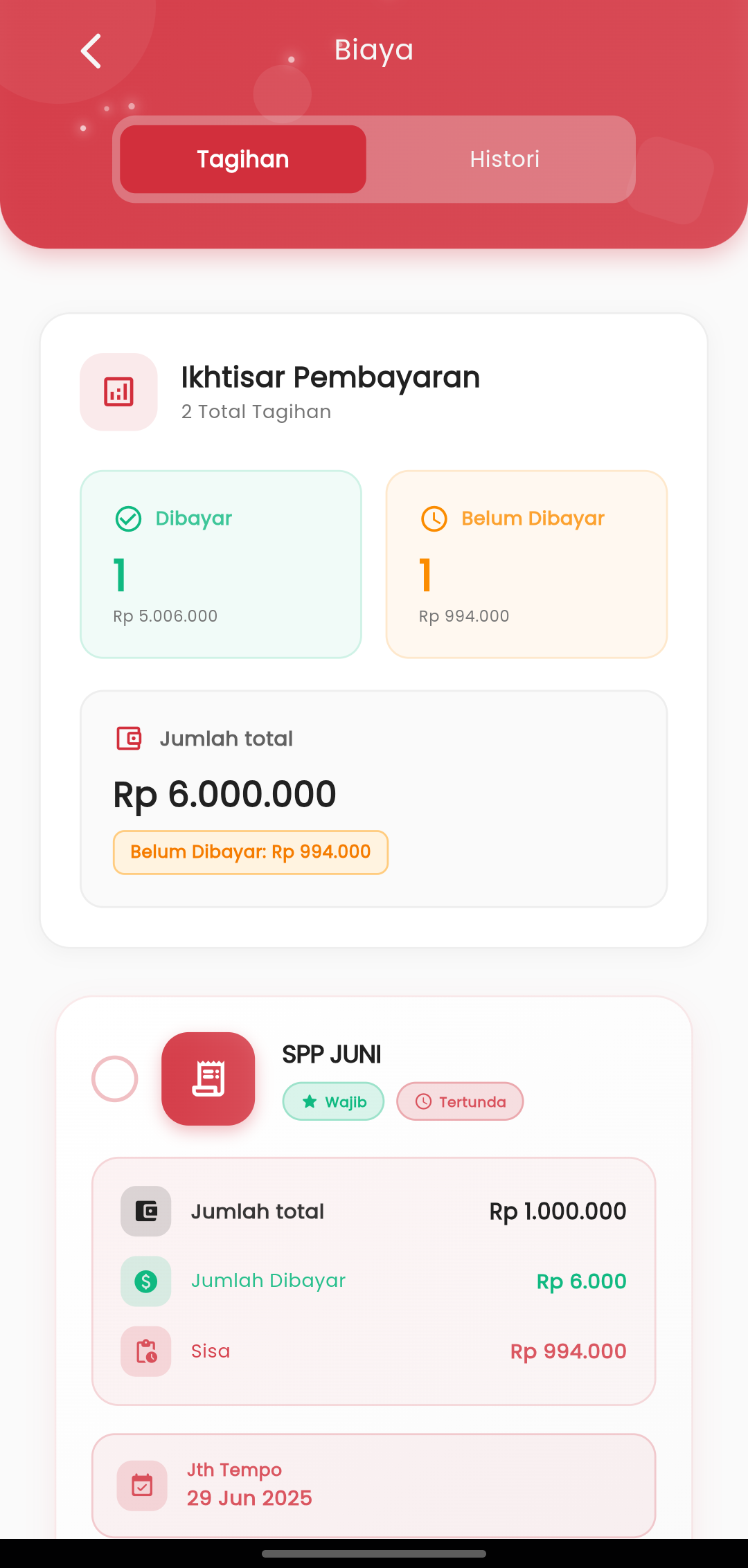
The Fees feature in the eSchool Mobile application is designed so that parents can monitor child school payment status practically, transparently, and in real-time. All important information is displayed concisely and is easy to understand, without needing to open manual reports.
Features & Display:
-
Bill List
As soon as the page opens, you will immediately see:
- Number of Paid Bills complete with total nominal amount.
- Number of Unpaid Bills along with the total remaining balance.
- Overall total student bills.
Green indicates paid status, while orange highlights pending bills.
-
View Details for Each Bill
Each bill is displayed in a special card, containing:
- Bill name (e.g., JUNE TUITION)
- Bill status (Required, Pending)
- Total bill amount
- Amount already paid
- Remaining balance
- Payment deadline (Due Date)
This interface makes it easy for you to immediately identify which bills must be paid soon, without having to calculate manually or ask the school.
If you want to view the history of previously completed payments, simply swipe to the History tab at the top.